The Benches page lists bench inventory reported by registered hosts in Air Traffic Control (ATC). Use this page to search benches, filter by host or workshop, open bench details on the host, and assign benches to workshops.
Benches List
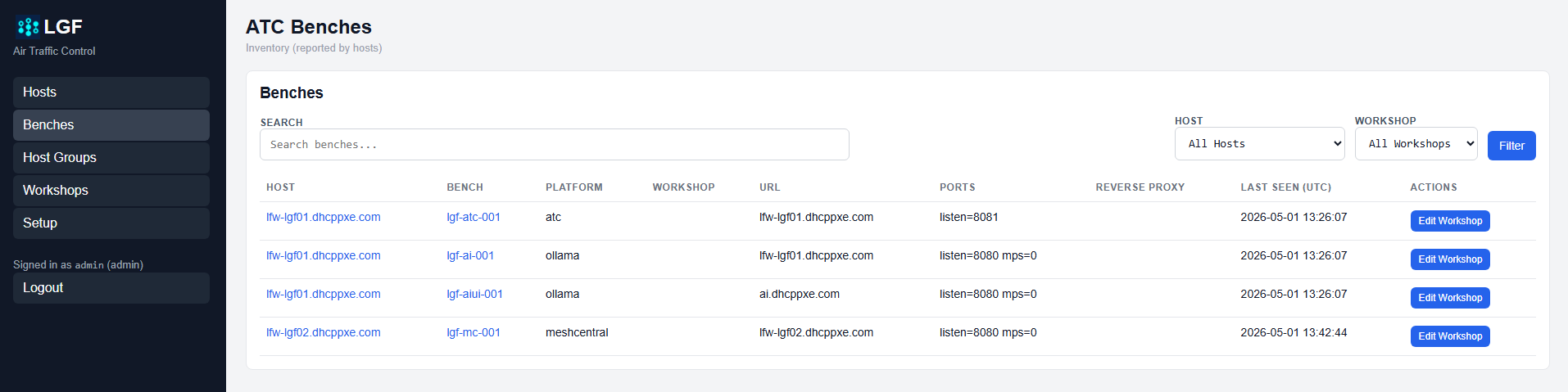
ATC Benches page
The Benches list shows reported bench inventory and includes:
- Host: Host reporting the bench
- Bench: Bench name
- Platform: Deployed platform
- Workshop: Assigned workshop, if any
- URL: Bench access hostname
- Ports: Reported bench ports
- Reverse Proxy: Reverse proxy value, if configured
- Last Seen: Last reported inventory timestamp
Open Bench Details
Clicking the Bench name opens that bench's Bench Details page on the host that reported it.
Search and Filter Benches
Benches can be filtered in three ways:
- Search: Search benches by string
- Host Filter: Show benches from a selected host
- Workshop Filter: Show benches assigned to a selected workshop
Assign a Bench to a Workshop
Click Edit Workshop next to a bench to assign or remove its workshop membership.
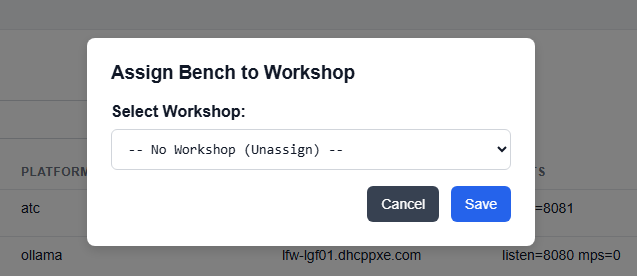
Assign bench to workshop dialog
- Click Edit Workshop for the bench.
- Select a workshop from the dropdown.
- Click Save.
Expected Result
- Reported benches are visible in ATC.
- Benches can be searched or filtered by host or workshop.
- Bench workshop assignment is updated from the Benches page.
- Bench links open the corresponding Bench Details page on the reporting host.