The GitLab platform provides a self-hosted GitLab instance for source control, issue tracking, and CI/CD. It includes the GitLab web interface and can optionally expose SSH access for git operations.
Overview
GitLab is used as an internal code forge and repository host within LGF.
- Git repository hosting
- Web-based project management
- CI/CD pipelines
- Optional SSH access for git operations
GitLab can also be used to host LGF mirror repositories for fully internal deployments.
⚠️ Startup Behavior (Important)
GitLab takes significantly longer to initialize than other platforms.
- Initial startup can take several minutes
- The web interface may return 502 errors during this time
- This is expected behavior while internal services initialize
Do not attempt repair or restart during this phase. Allow the system to complete initialization before taking action.
Deployment
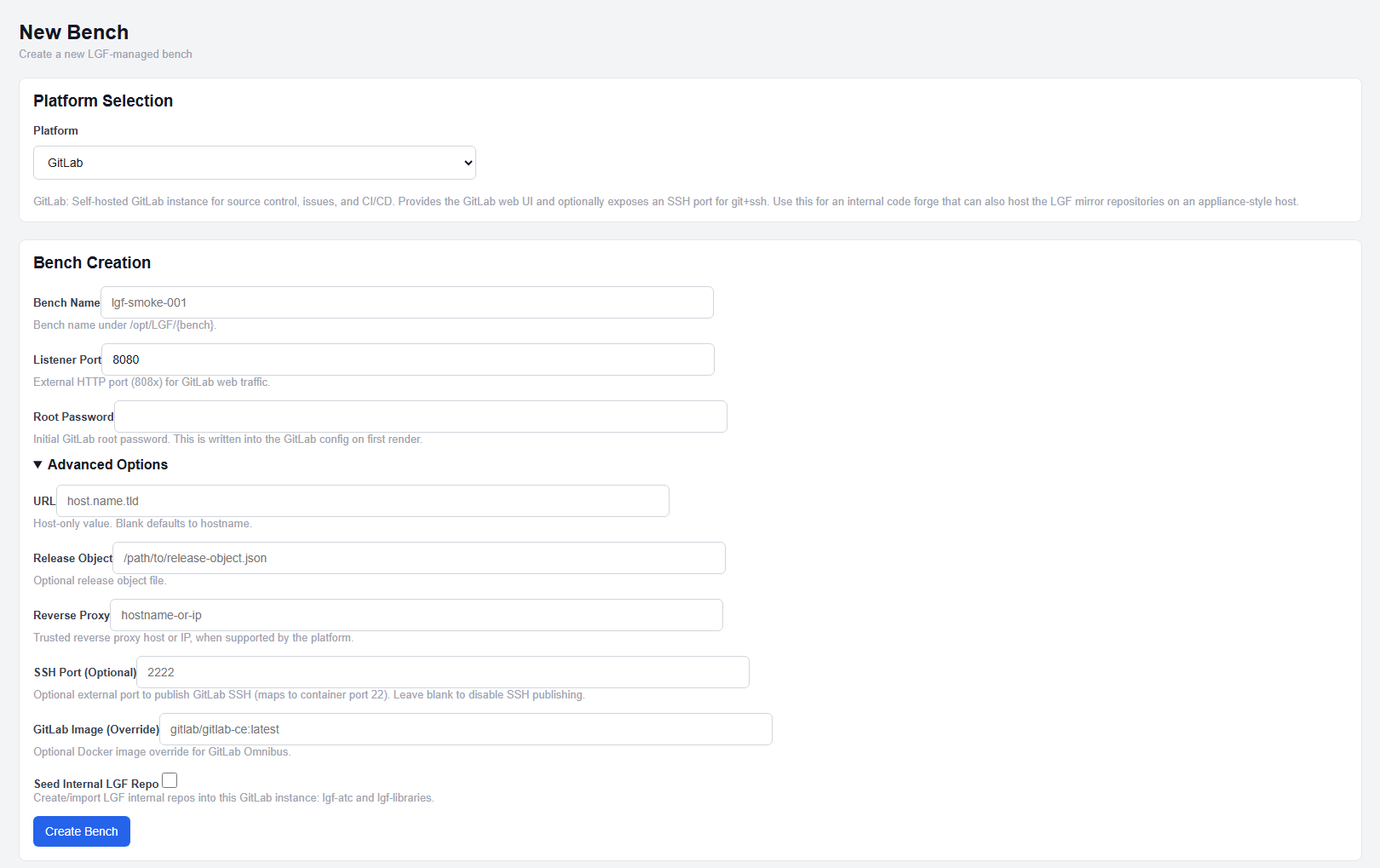
GitLab deployment configuration
- Select GitLab from the platform dropdown.
- Enter a Bench Name.
- Set the Listener Port.
- Enter a Root Password.
- (Optional) Configure additional fields.
- Click Create Bench.
Required Fields
- Root Password: Initial GitLab root account password
This password is written into the GitLab configuration during first render.
Standard Fields
- Bench Name: Unique identifier for the deployment
- Listener Port: External HTTP port for GitLab web traffic
- URL: Host-only URL (no scheme, path, or port)
- Reverse Proxy: Optional reverse proxy hostname or IP
URL defaults to an automatically generated hostname if not provided.
Advanced Options
- SSH Port (Optional): External port for GitLab SSH access (maps to container port 22)
- GitLab Image (Override): Optional Docker image override for GitLab Omnibus
- Seed Internal LGF Repo: Automatically creates and seeds LGF repositories into GitLab
Seeding creates internal repositories such as:
lgf-atclgf-libraries
These are populated using LGF's internal mirror sources.
Expected Result
- The GitLab bench is created and enters a building state
- Services initialize over several minutes
- The web interface becomes accessible once initialization completes
Important Notes
- Startup time is significantly longer than other platforms
- Temporary 502 errors during startup are normal
- Root Password must be set during deployment
- URL must be host-only (no scheme, path, or port)
- SSH access is optional and disabled unless configured
- Reverse proxy is recommended for external access
Next Steps
- Access the GitLab web interface once available
- Log in using the root account
- Configure users, groups, and repositories
- Set up SSH access if required