Overview
This article explains how administrators can customize the branding of the LGF Cloud Portal. This allows you to change the portal's name, logo, and other visual elements to match your organization's identity. This feature is restricted to users with administrative privileges.
Prerequisites
- Administrative access to the LGF Cloud Portal.
- URLs for the logo, icon, and accent images you wish to use.
Steps
1. Access the Branding Settings
The branding settings are available in the administrative area of the Cloud Portal.
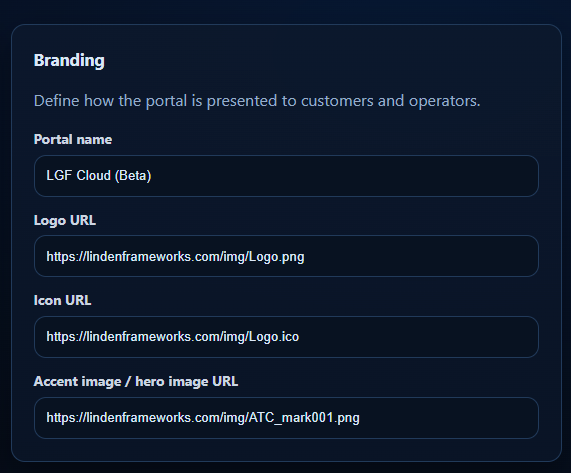
_Figure: The Branding configuration panel in the Cloud Portal._
- Log in to the Cloud Portal as an administrator.
- Navigate to the administrative settings section.
- Locate the Branding panel.
2. Configure Branding Options
Fill in the fields to define the portal's appearance.
- Portal name: Enter the name you want to display throughout the portal.
- Logo URL: Provide a direct URL to your company's logo image (e.g., a PNG file).
- Icon URL: Provide a direct URL to the icon file (e.g., an ICO file) that will be used for the browser favicon.
- Accent image / hero image URL: Provide a direct URL to an image that will be used as a primary visual element or hero image in the portal's user interface.
- Click Save to apply the changes.
Verification
- After saving the settings, refresh the Cloud Portal pages to see the updated branding.
- The portal name should be updated in the header and titles.
- The new logo should appear in the designated logo areas.
- The browser tab should display the new favicon.
- The accent or hero image should be visible in its designated location.
Troubleshooting
Images are not updating
- Cause: The browser may have cached the old images.
- Fix: Perform a hard refresh of the browser (Ctrl+F5 or Cmd+Shift+R) or clear the browser cache.
Invalid URL errors
- Cause: The URLs provided for the images may be incorrect, inaccessible, or not direct links.
- Fix: Verify that each URL points directly to an image file and is publicly accessible from the user's browser.